01-04.Vue的举例:列表功能
步骤 1:列表功能
<!DOCTYPE html>
<html lang="en">

<head>
    <meta charset="UTF-8">
    <meta name="viewport" content="width=device-width, initial-scale=1.0">
    <meta http-equiv="X-UA-Compatible" content="ie=edge">
    <title>Document</title>
    <style>
        .table {
            width: 800px;
            margin: 20px auto;
            border-collapse: collapse; /*这一行,不能少:表格的两边框合并为一条*/
        }

        .table th {
            background: #0094ff;
            color: white;
            font-size: 16px;
            border: 1px solid black;
            padding: 5px;

        }

        .table tr td {
            text-align: center;
            font-size: 16px;
            padding: 5px;
            border: 1px solid black;
        }
    </style>

    <script src="vue2.5.16.js"></script>
</head>

<body>

<div id="app">

    <table class="table">
        <th>编号</th>
        <th>名称</th>
        <th>创建时间</th>
        <th>操作</th>
        <tr v-for="item in list">
            <td>{{item.id}}</td>
            <td>{{item.name}}</td>
            <td>{{item.ctime}}</td>
            <td><a href="#">删除</a></td>
        </tr>
    </table>
</div>

</body>

<script>
    var vm = new Vue({
        el: '#app',
        data: {
            list: [{id: 1, name: '奔驰', ctime: new Date}, {id: 2, name: '大众', ctime: new Date}]
        }
    })

</script>

</html>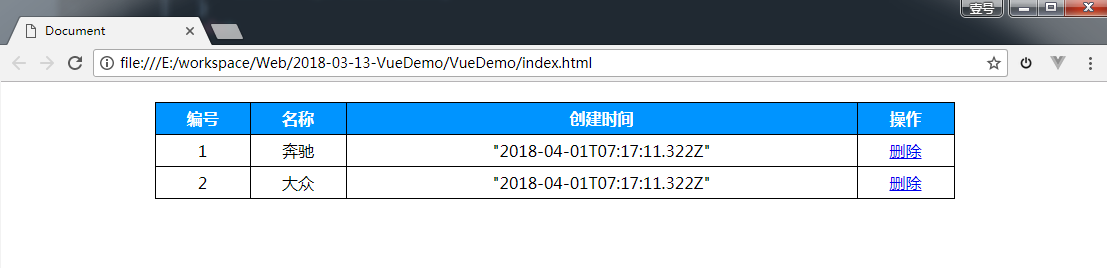
步骤 2:无数据时,增加提示

步骤 3:item的添加
步骤 4:item的删除
步骤 5:按条件筛选item
Last updated